|
|

|
|
|
|
|
BellHawk and MilramX, plus WIPtracker and SmartOps24x7, all contain a Control.ini initialization file which relates Adaptors, such as BellHawk to physical databases. This file is setup at system deployment time but can be modified bythe Systems Administrator.
This initialization file is read whenever a new web browser or web-services session starts and is used to link the Tau Adaptor libraries to Physical Databases.
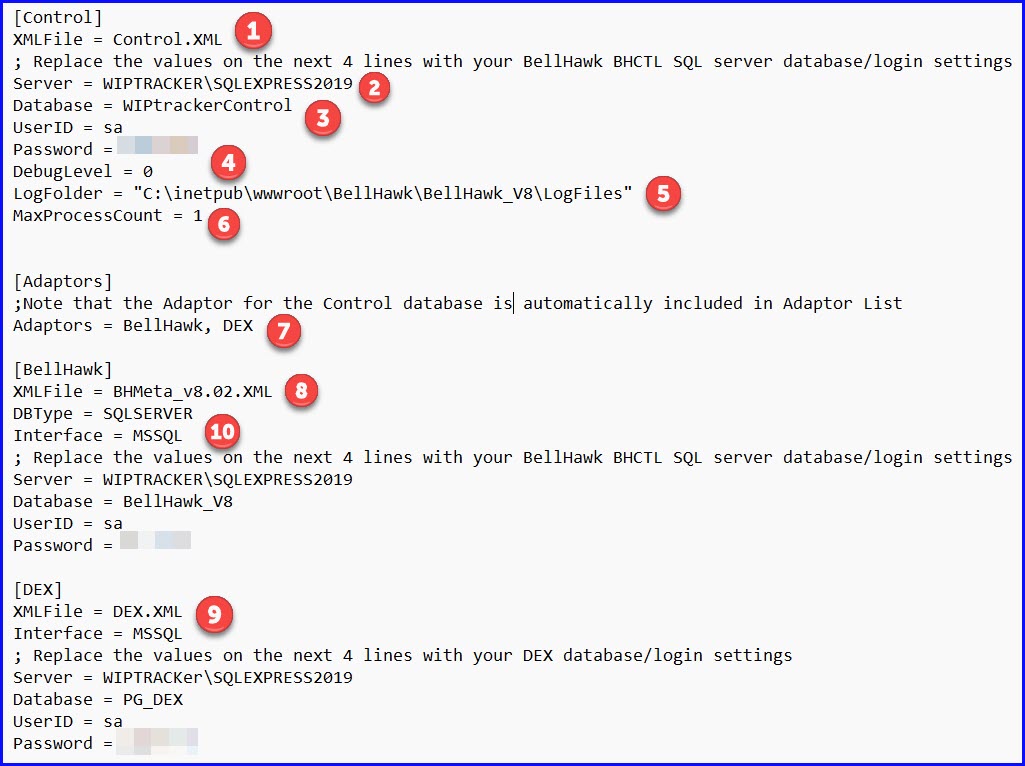
In the Control initialization file:
The Control Adaptor (1) gives the Tau Adaptor libraries access to the Control database and specifies the XML file containing the HLDO definitions for this database.
We specify the SQL Server name (2), which is typically prefixed with the computer name on which it runs.
Then we specify the database (3) and a user login with at least read/write/update privileges.
The debug level (4) provides a default value which specifies whether messages are output only for errors, if the value is 0, for both errors and warnings, or for errors, warnings, and informational messages.
Errors, Warnings, and Informational Messages can be output to a daily log file. By default, these are written to the LogFiles folder but can be stored elsewhere, such as a publicly accessible folder if this is more convenient by changing the entry (5) in Control.ini.
MaxProcessCount (6) enables tuning of the system to only run a limited number fintelligent agents processes at a time. Used by MilramX and WIPtracker.
[Adaptors] (7) gives a list of database adaptors accessible to the MxPclass and the Tau Adaptor. Note that the database adaptor for the Control database is automatically included so that it appears as a selector on the DEXEL page.
Adaptors for the BellHawk (8) and DEX (9) databases give the access information for these databases as well as the XML files containing their HLDO definitions.
Note that the Control database uses whatever database ODBC driver is native to the Windows O/S, such as MS SQL, but other databases can use other databases. In the example shown here both BellHawk and DEX Interfaces use (10) the MSSQL Interface.
Please click here to learn How High Level Data Objects are defined.
| TauAdaptor | HLDOs | Sample Code | Adaptors | Web Services |
Copyright © SmartOpsMgt LLC 2026