|
|

|
|
|
|
|
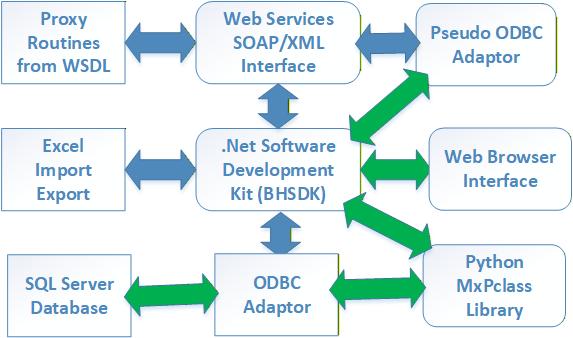
At the core of the libraries is the BHSDK library which converts lookup, fetch, getnext, getrecord, store, run. and delete calls with HLDOs as parameters to actions on a designated SQL database. The BellHawk, MilramX, WIPtracker and SmartOps24x7 web browser interfaces all call this DLL to perform actions on their databases.
The BHSDK library may carry out its actions by calling an ODBC adaptor, which is a thin shell on a Microsoft ODBC driver (or could be an Oracle or MySQL ODBC diver). Alternately the BHSDK may call a pseudo ODBC driver. This could be via an interface to web-services proxy routine libraries, if the data is being exchanged with a remote computer.
It could also be via a pseudo ODBC driver, such as ODBC which exchanges data with QuickBooks, as if the QuickBooks data base had an ODBC driver. Yet another option is where the pseudo ODBC driver simply passes the methods and HLDO data to a subroutine library which knows how to interpret the six methods into calls to an external system, without using an ODBC intermediary protocol.
Excel Imports and Exports are handled by a set of libraries that convert these to and from the six methods to actions on HLDOs and then passes these requests to the BHSDK library.
Python Scripts use the MxPclass library to convert HLDOs to an from JSON structures and then are able to use the six methods to exchange data with the designated database.
While working with HLDOs and their equivalent JSON strings can make accessing the BellHawk and other databases much easier, there are times when using SQL queries are much easier for things like generating complex reports. To this end, the MxPclass supports extracting a connection string based on the contents of the Control.ini and using this as part of a call to the pyodbc library.
Please click here to download a copy of the MxPclass User Manual.
| TauAdaptor | HLDOs | Sample Code | Adaptors | Web Services |
Copyright © SmartOpsMgt LLC 2026