|
|

|
|
|
|
|
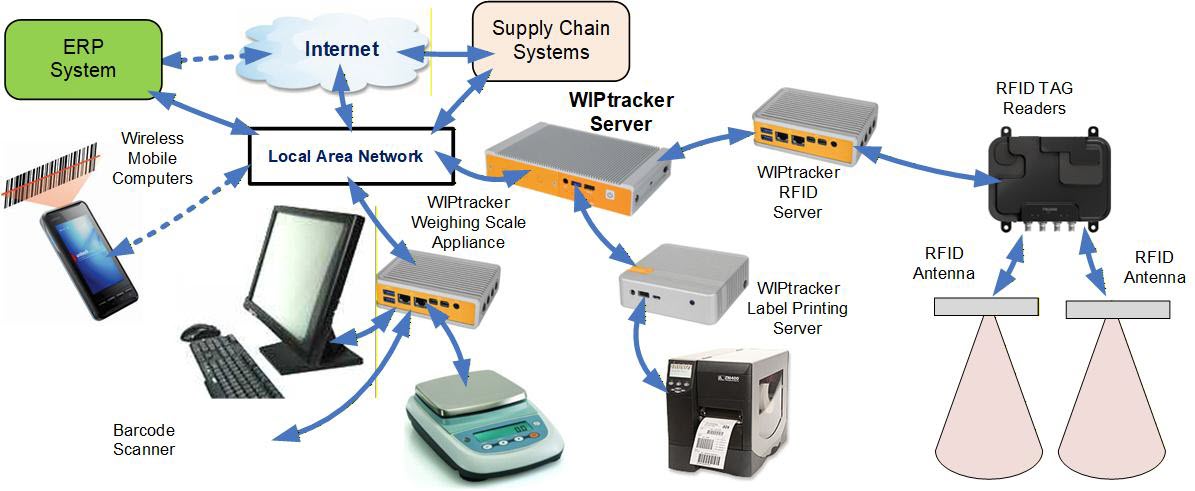
For those organizations that need more advanced capabilities than are provided by BellHawk itself, additional IOT (Internet of Things) computer boxes can be added to BellHawk (running as part of WIPtracker or on a remote Windows server) for barcode label printing, RFID tracking and the integration of data from weighing scales, to ensure accurate data capture.
BellHawk can also use customized software in yet more IOT boxes to pass orders to process-control lines and test-stands as well as to retrieve data from these systems.
The software in each IOT accessory computer can communicate with the WIPtracker/BellHawk server computer, using secure BellHawk SOAP/XML encrypted interface over the local area network or, with appropriate Internet firewall access settings, to remote WIPtracker or BellHawk servers.
This software is designed to work in "store and forward" mode, whereby if the IOT box cannot communicate with the WIPtracker/BellHawk server, such as if the Internet is down, it will simply back-off and wait until communication is available.
The primary BellHawk IOT accessory software applications are as follows:
In each case, these accessories are configurable by a combination of rules, setup parameters and Python scripts, as appropriate.
| Data Sheets | User Manuals | Capabilities | Demo Videos | Applications |
Copyright © SmartOpsMgt LLC 2026